> ## Documentation Index
> Fetch the complete documentation index at: https://docs.pylon.mortgage/llms.txt
> Use this file to discover all available pages before exploring further.
# Building with AI
> Leverage AI-ready documentation formats and seamless integrations with leading AI platforms directly from any Pylon docs page
## Introduction
Every page in the Pylon documentation comes equipped with built-in AI tooling designed to accelerate your development workflow. Whether you need quick answers, want to explore architectural decisions, or require deep-dive analysis, our AI integrations put powerful assistance just a click away.
## Finding the AI tools
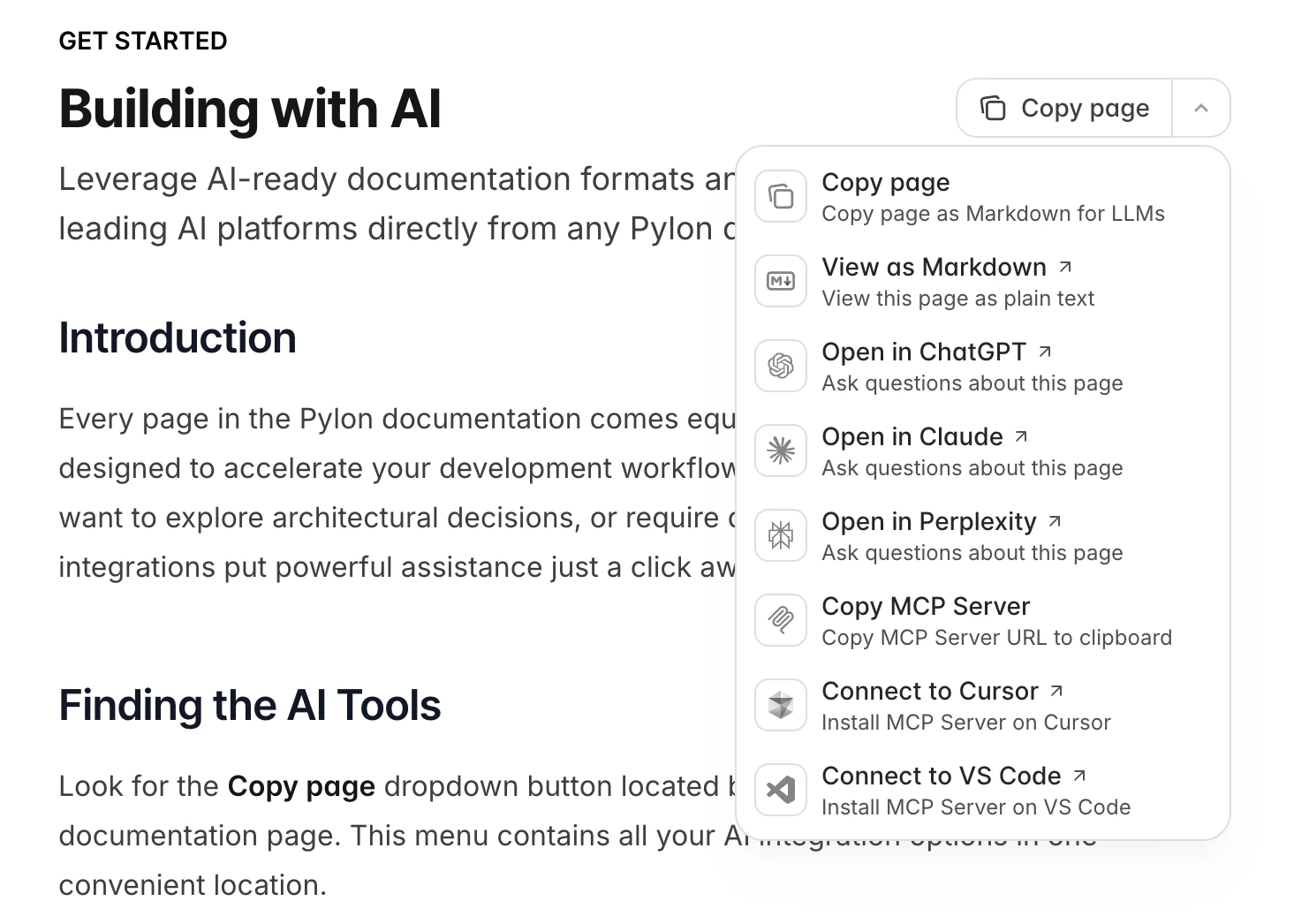
Look for the **Copy page** dropdown button located beside the page title on any documentation page. This menu contains all your AI integration options in one convenient location.
 ## What's available
### Copy options
1. **Copy page** - Copies the page content as standard markdown text.
2. **Copy page as Markdown for LLMs** - Exports the page in a format structured for AI consumption with additional context markers.
3. **View as Markdown** - Renders the current page as plain markdown in your browser.
### Open in AI tools
1. **Open in ChatGPT** - Launches ChatGPT with the current page content automatically loaded.
2. **Open in Claude** - Opens Claude with the page pre-loaded as context.
3. **Open in Perplexity** - Sends the page content to Perplexity.
### Full documentation access
For questions that span multiple areas of the platform, you can provide AI tools with our entire documentation set in a single optimized file.
Access it at: `https://docs.pylon.mortgage/llms-full.txt`
This consolidated file gives AI assistants complete visibility into all Pylon features, APIs, and concepts.
## Usage workflows
### Quick AI consultation
1. Navigate to the relevant Pylon documentation page
2. Open the **Copy page** dropdown
3. Select your preferred AI platform (ChatGPT, Claude, or Perplexity)
4. The tool opens with full page context ready for your questions
### Manual integration
1. Go to any documentation page
2. Click **Copy page** and select **Copy page as Markdown for LLMs**
3. Paste the copied content into your AI tool of choice
4. Ask your questions with the documentation as context
### Comprehensive research
When your question touches multiple parts of the Pylon platform:
1. Visit `https://docs.pylon.mortgage/llms-full.txt`
2. Provide this URL or its contents to your AI assistant
3. Ask questions that require understanding of the full platform
## Tips for better results
**Be specific about your context.** Let the AI know what you're building, whether it's an integration, a custom workflow, or troubleshooting an issue.
**Include relevant code.** When asking about implementation details, paste in the code you're working with.
**Reference specific components.** Mention which Pylon features or APIs you're using.
**Use llms-full.txt for cross-cutting questions.** If your question involves how different parts of Pylon work together, give the AI access to the complete documentation.
***
> For a complete index of all documentation pages, access the llms.txt file at: [https://docs.pylon.mortgage/llms.txt](https://docs.pylon.mortgage/llms.txt)
## What's available
### Copy options
1. **Copy page** - Copies the page content as standard markdown text.
2. **Copy page as Markdown for LLMs** - Exports the page in a format structured for AI consumption with additional context markers.
3. **View as Markdown** - Renders the current page as plain markdown in your browser.
### Open in AI tools
1. **Open in ChatGPT** - Launches ChatGPT with the current page content automatically loaded.
2. **Open in Claude** - Opens Claude with the page pre-loaded as context.
3. **Open in Perplexity** - Sends the page content to Perplexity.
### Full documentation access
For questions that span multiple areas of the platform, you can provide AI tools with our entire documentation set in a single optimized file.
Access it at: `https://docs.pylon.mortgage/llms-full.txt`
This consolidated file gives AI assistants complete visibility into all Pylon features, APIs, and concepts.
## Usage workflows
### Quick AI consultation
1. Navigate to the relevant Pylon documentation page
2. Open the **Copy page** dropdown
3. Select your preferred AI platform (ChatGPT, Claude, or Perplexity)
4. The tool opens with full page context ready for your questions
### Manual integration
1. Go to any documentation page
2. Click **Copy page** and select **Copy page as Markdown for LLMs**
3. Paste the copied content into your AI tool of choice
4. Ask your questions with the documentation as context
### Comprehensive research
When your question touches multiple parts of the Pylon platform:
1. Visit `https://docs.pylon.mortgage/llms-full.txt`
2. Provide this URL or its contents to your AI assistant
3. Ask questions that require understanding of the full platform
## Tips for better results
**Be specific about your context.** Let the AI know what you're building, whether it's an integration, a custom workflow, or troubleshooting an issue.
**Include relevant code.** When asking about implementation details, paste in the code you're working with.
**Reference specific components.** Mention which Pylon features or APIs you're using.
**Use llms-full.txt for cross-cutting questions.** If your question involves how different parts of Pylon work together, give the AI access to the complete documentation.
***
> For a complete index of all documentation pages, access the llms.txt file at: [https://docs.pylon.mortgage/llms.txt](https://docs.pylon.mortgage/llms.txt)